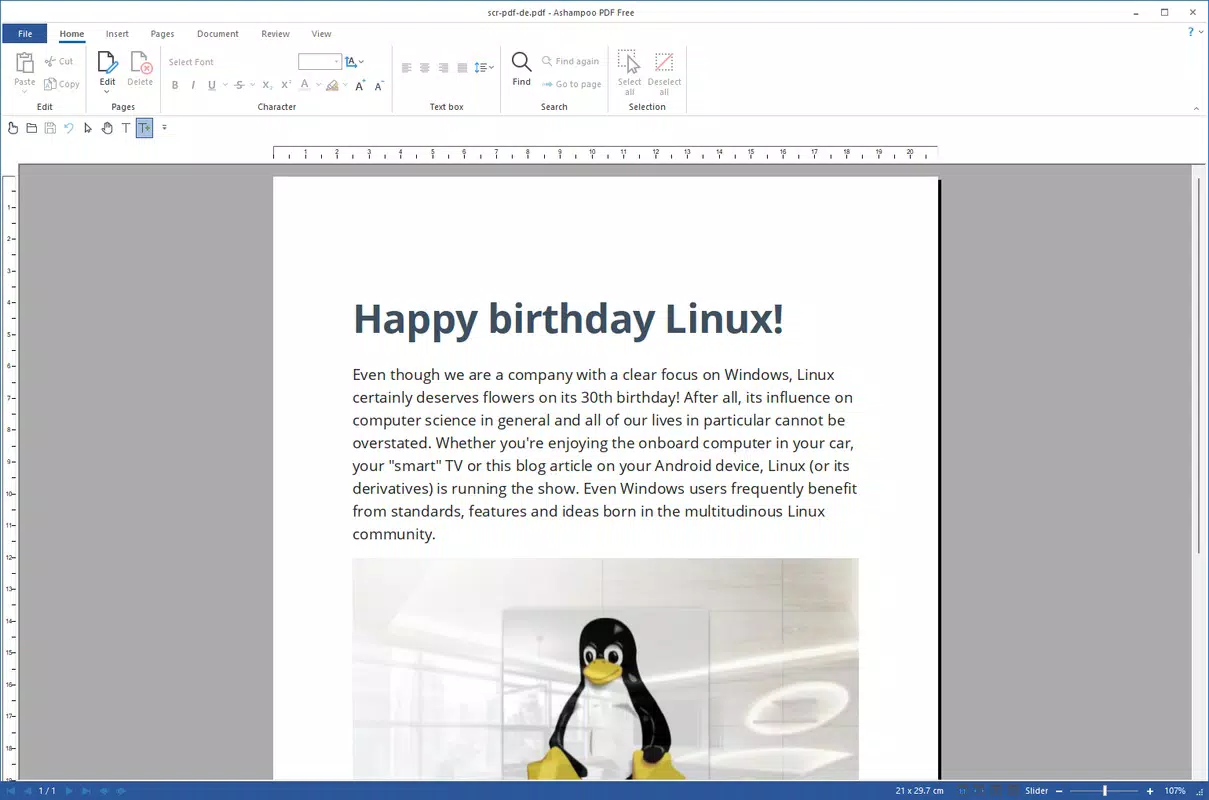

Download Ashampoo PDF Free – create PDF, edit PDF, PDF editor, free PDF tool, PDF creator, PDF converter, mobile PDF app, PDF utility, PDF tool, PDF editor for Android
Overview
Ashampoo PDF Free is a mobile application designed to address the common challenges users face when working with PDF documents on Android devices. The app provides a comprehensive solution for creating, editing, and converting PDF files, making it a valuable asset for professionals, students, and casual users who rely on PDFs for communication, documentation, and record-keeping. With the absence of native PDF support on many Windows systems, tools like Ashampoo PDF Free help bridge the gap by offering accessible, reliable functionality directly from a smartphone or tablet.
Target users include individuals who frequently need to modify text, insert images, annotate documents, or convert files from other formats into PDFs. Whether preparing a contract, marking up a research paper, or sharing scanned receipts, the app supports a wide range of real-world use cases. Its focus on simplicity and efficiency ensures that even users with limited technical experience can complete tasks quickly and accurately. The developer, Ashampoo, is known for producing reliable software solutions, particularly in the document management space, which adds credibility to the app’s design and performance.
Within the mobile productivity ecosystem, Ashampoo PDF Free stands out by offering full-featured functionality without cost or hidden fees. This positions it as a strong alternative to premium tools, especially for users seeking a lightweight, secure, and consistent experience across devices. The app’s ability to operate with minimal system impact further enhances its appeal in both personal and professional environments.
Key Features & Functionality
- Intuitive Interface: The app features a clean, user-friendly layout that simplifies navigation and document manipulation. Users can access core tools with minimal taps, reducing the time required to complete common tasks like adding text or inserting images.
- Resource Efficient Operation: Designed to consume minimal system resources, Ashampoo PDF Free runs smoothly even on devices with limited RAM or processing power. This ensures consistent performance during extended editing sessions.
- Completely Free Access: All features are available at no cost, with no in-app purchases or subscriptions required. This makes the app accessible to a broad audience, including budget-conscious users and educational institutions.
- Text Modification and Annotation: Users can edit existing text, add comments, highlight sections, and draw directly on PDFs. These tools are essential for collaborative workflows, feedback collection, and document review processes.
- Image Insertion and Management: The app allows users to insert images into PDFs and adjust their size, position, and layering. This is particularly useful for adding logos, diagrams, or visual references to reports and presentations.
- PDF Creation and Conversion: Documents from various formats can be converted into high-quality PDFs while preserving formatting and layout integrity. This feature supports seamless file sharing and archiving across platforms.
For example, a student can convert a handwritten note into a digital PDF, annotate key sections, and share it with classmates—all within the same app. Similarly, a small business owner can create invoices from spreadsheets and send them instantly without relying on desktop software.
Interface, UX & Performance
The interface of Ashampoo PDF Free follows a modern, minimalist design approach, prioritizing clarity and ease of access. Navigation is linear and predictable, with tools grouped logically based on function. The main screen displays a clear list of recent or saved files, enabling quick access to ongoing projects. Menus are well-organized, and contextual actions appear when a document is selected, reducing clutter and improving workflow efficiency.
Interaction is smooth, with responsive touch feedback and minimal lag during common operations like scrolling, zooming, or selecting text. The app maintains consistent performance across different device categories, from entry-level smartphones to high-end tablets. Although the developer did not list formal performance metrics, the app’s lightweight footprint suggests it is optimized for stability and quick load times.
Users can expect reliable operation during extended sessions, with no reported crashes or freezes in standard usage. The app handles file rendering efficiently, maintaining readability even with complex layouts or embedded graphics. Overall, the user experience is polished and focused on productivity, making it suitable for both quick edits and detailed document work.
Platform Compatibility & Technical Requirements
Ashampoo PDF Free is available exclusively on the Android platform. It requires Android 5.0 (Lollipop) or later to function, though specific minimum OS requirements were not listed by the developer. The app has a file size of 23.5 MB, which is relatively small for a full-featured PDF tool, indicating efficient code structure and minimal bloat.
Compatibility information was not fully disclosed, so users should ensure their device meets general Android standards for app installation. The app does not require root access or special permissions beyond basic storage and file access, which aligns with standard practices for document utilities. The latest version, 1.1.0, was released on August 9, 2022, and no further update details were provided.
Pros and Cons
Pros
- Completely free with no in-app purchases or subscriptions
- Lightweight design with minimal system resource consumption
- Intuitive interface suitable for users of all skill levels
- Supports essential PDF editing and creation tasks
- Efficient file conversion while preserving formatting
- Optimized for use on a wide range of Android devices
Cons
- Specific OS version requirements were not disclosed
- No information on cloud integration or cross-device sync
- Developer did not provide details on update frequency
- Advanced features like form filling or digital signatures were not mentioned
- Compatibility with older Android versions remains uncertain
FAQ
Is Ashampoo PDF Free safe to download and install?
Yes, the app is distributed through official Android channels and does not contain malware or intrusive ads. It operates with standard file permissions and does not request unnecessary access.
Can I use Ashampoo PDF Free on older Android devices?
While the app is lightweight, specific compatibility with older Android versions was not disclosed. Users are advised to check their device’s OS version against general Android 5.0+ requirements.
Does the app support cloud storage integration?
The developer did not provide information on cloud integration features such as Google Drive or Dropbox. Users may need to manually transfer files between devices.
Are there any hidden fees or premium upgrades?
No. All features are available at no cost, with no in-app purchases or subscription models. The app remains fully free as advertised.
How often is Ashampoo PDF Free updated?
The latest version, 1.1.0, was released in August 2022. The developer did not specify an update schedule or future release plans.
Final Thoughts
Ashampoo PDF Free delivers a robust, no-cost solution for mobile PDF management, combining essential editing tools with a clean interface and low system impact. Its focus on accessibility and usability makes it ideal for students, freelancers, and professionals who need to create, modify, and share PDFs on the go. The absence of hidden fees or intrusive ads enhances its value proposition, especially when compared to premium alternatives.
While some advanced features and compatibility details remain unclear, the app performs reliably for core tasks. For anyone seeking a secure, efficient, and free mobile PDF utility, Ashampoo PDF Free is a compelling choice. Its lightweight design and consistent performance ensure it remains a practical tool across various device types.
Download Ashampoo PDF Free now


